---
title: How do I download reports from the dashboard?
description: How do I generate reports from the Dashboard?
---
[Skip to content](https://support.gritcargo.com/how-do-i-generate-reports-from-the-dashboard#main-content)
[](https://gritcargo.com/)
- [Submit a Ticket](https://support.gritcargo.com/submit-a-ticket)
Open main navigation
Close main navigation
- [Submit a Ticket](https://support.gritcargo.com/submit-a-ticket)
- [Go to GritCargo.com](https://www.gritcargo.com/)
[Go to GritCargo.com](https://www.gritcargo.com/)
How can we help you?
- There are no suggestions because the search field is empty.
1. [Help Centre](https://support.gritcargo.com/?hsLang=en-gb)
2. [Guides](https://support.gritcargo.com/guides?hsLang=en-gb)
3. [Dashboard](https://support.gritcargo.com/guides?hsLang=en-gb#dashboard)
# How do I download reports from the dashboard?
Reports can be downloaded as a PDF or a CSV file by doing the following:
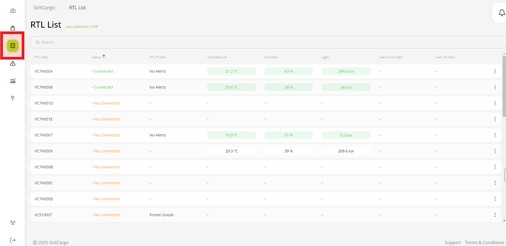
Step 1: Navigate to the RTL List icon on the left of the screen
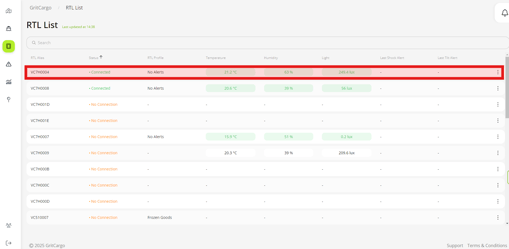
Step 2: Find the RTL you are interested in
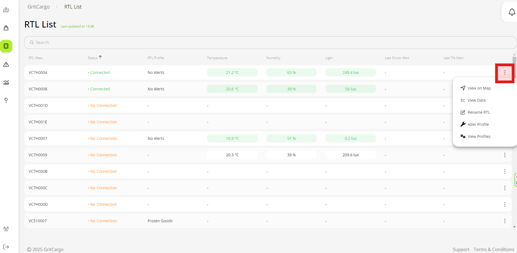
Step 3: Click on the 3 dots to the right of the screen to open the dropdown menu
Step 4: Select "View Data" option from the dropdown menu
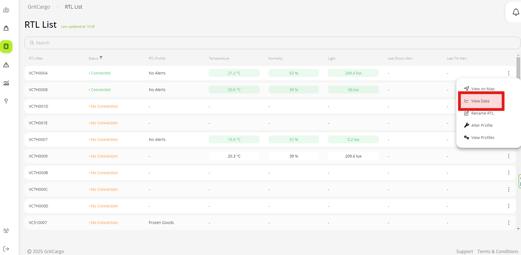
Step 5: This will open the graph and map, where you can select the Activity and date range you require to reflect on the report
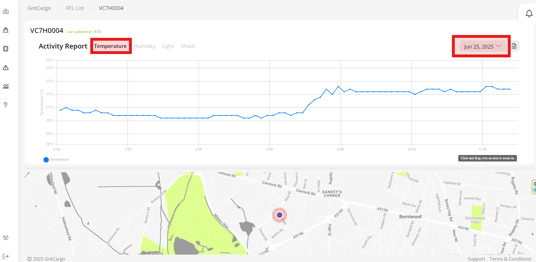
Step 6: Click on the download report icon to the left of your screen
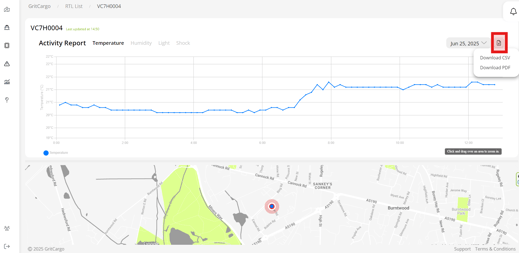
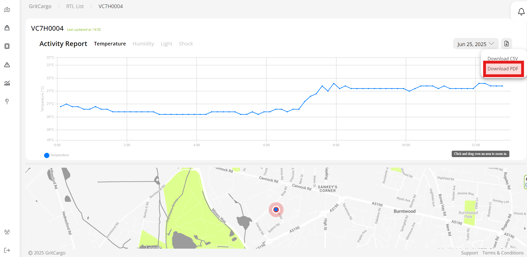
Step 7: Select the report format from the options provided
You can also view a short video here:
- [Getting started](https://support.gritcargo.com/getting-started?hsLang=en-gb#main-content)
- [iMSense RTL](https://support.gritcargo.com/getting-started?hsLang=en-gb#imsense-rtl)
- [Dashboard](https://support.gritcargo.com/getting-started?hsLang=en-gb#dashboard)
- [Guides](https://support.gritcargo.com/guides?hsLang=en-gb#main-content)
- [iMSense RTL](https://support.gritcargo.com/guides?hsLang=en-gb#imsense-rtl)
- [Dashboard](https://support.gritcargo.com/guides?hsLang=en-gb#dashboard)
- [Troubleshooting](https://support.gritcargo.com/troubleshooting?hsLang=en-gb#main-content)
- [iMSense RTL](https://support.gritcargo.com/troubleshooting?hsLang=en-gb#imsense-rtl)
- [Dashboard](https://support.gritcargo.com/troubleshooting?hsLang=en-gb#dashboard)
- [FAQs](https://support.gritcargo.com/faqs?hsLang=en-gb#main-content)
- [iMSense RTL](https://support.gritcargo.com/faqs?hsLang=en-gb#imsense-rtl)
- [Dashboard](https://support.gritcargo.com/faqs?hsLang=en-gb#dashboard)
- [Compliance & Security](https://support.gritcargo.com/compliance-security?hsLang=en-gb#main-content)
- [iMSense RTL](https://support.gritcargo.com/compliance-security?hsLang=en-gb#imsense-rtl)
[](https://support.gritcargo.com/?hsLang=en-gb)
[mailto:support@gritcargo.com](mailto:support@gritcargo.com)
Copyright © 2025,
```json
{
"@context" : "https://schema.org",
"@type" : "VideoObject",
"contentUrl" : "https://stream.mux.com/ZCrXFF4R4baL7lGo500100k00QZr2LlJXt5DWBEk61H01eM/capped-1080p.mp4",
"dateModified" : "2025-07-25T07:23:34.632Z",
"duration" : "PT36S",
"height" : 1080,
"name" : "Download reports",
"thumbnailUrl" : "https://47660588.fs1.hubspotusercontent-na1.net/hubfs/47660588/Videos/Download%20reports.mp4/medium.jpg",
"uploadDate" : "2025-07-25T07:14:29.021Z",
"width" : 1920
}
```